
For visual artists selling originals and prints using WooCommerce
“I love it. I just can’t tell how big it is.”
Someone thought that about your work this week. They didn’t say it to you. They closed the tab.
Wall Buzzhangs your art on a photo of a real room, at its real size, so shoppers can see it before they buy. It’s a free plugin for WooCommerce.
See how your customers could be engaging with your work and easily buying your artwork:
or get Wall Buzz Gold for $79 a year
It’s 10 p.m., and someone is looking at your painting.
They’re on the couch with their phone. A friend shared your work, and they’ve been on the same piece for five minutes now. They like it. They keep scrolling back up to it.
The product page says 24 x 36 inches. They look up at the empty wall over the TV.
Is 24 inches big? Pillow big or door big? They hold their hands apart and squint at the gap. It doesn’t help.
Here’s what happens next, most of the time. They save it to look at later, and later doesn’t come. Or they buy the 11 x 14 inch because a smaller piece feels safe when you can’t picture the big one. Now and then someone emails to ask how big it really is. You write back with the measurements they already had.
You never heard from the ones who left. That’s what it costs you, and it doesn’t show up anywhere as a metric you can act on!
You’ve probably tried to fix this already
The size is in the title, in bold. Maybe there’s a photo of you holding the canvas. Maybe you bought a mockup of a white living room and dropped your art over its sofa.
Mockups look good, but they don’t answer the question. Nobody measured that sofa. The art in it was sized until it looked nice or “right”, so a 12 x 16 and a 30 x 40 can look exactly alike. A shopper who trusts it finds out the truth when the box arrives. If it’s an original, that can mean a return you didn’t need.
What your shopper wants is simple. They want to see it on a wall, at the size it really is.
So show them!
Picture the same person on the same couch in your mind. You can see them sitting there, and even see the cushion they have on their lap. This time they open your Wall Buzz page and press Hang it on a wall.
A living room fills the screen. Your painting is on the wall over a real couch, at 24 x 36 inches. They switch to 16 x20 and watch it shrink. They switch back. Yes, that one. They press Add to cart without leaving the screen, and you sale goes through you own checkout at your price.
That’s Wall Buzz!
Made for the way you sell
Wall Buzz works with what’s already in your shop.
Work sold in sizes, like prints. If a piece comes in 8×10, 16×20, and 24×36, those are the sizes a shopper can choose, and no others. Nobody falls for a size you don’t sell. A 24 x 36 isn’t the same shape or ratio as an 8×10, so any size can have its own image, and the Wall Buzz tab shows how much each one is visually cropped (without altering any of your media library files)
Originals and one-offs. A painting, a photograph or a linocut sold on its own hands at the size you enter in the product’s Wall Buzz tab.
Inches or centimeters? Wall Buzz follows the unit your shop already uses.

Why the sizes come out right
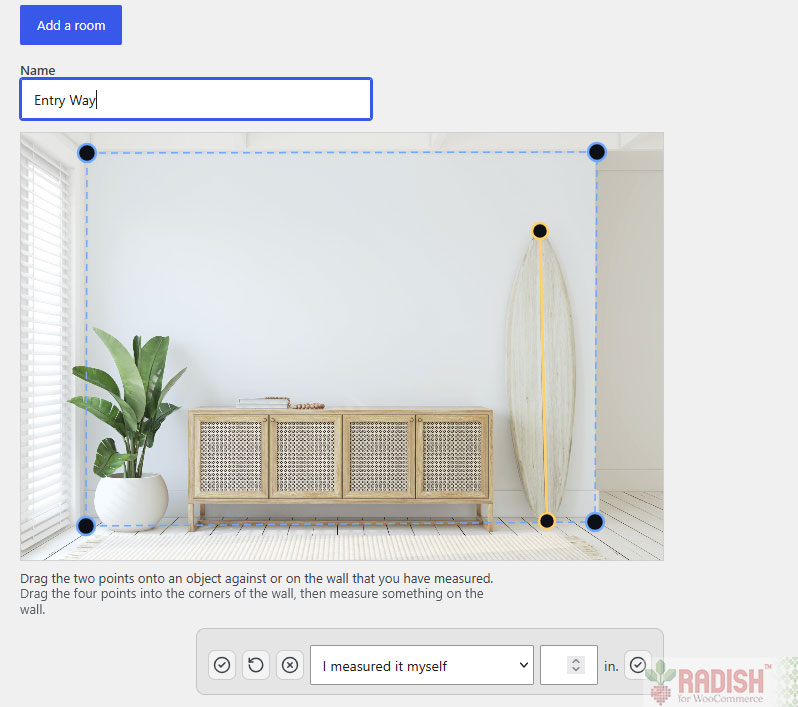
The Engine is the part of Wall Buzz that does the math. You mark the four corners of a wall, and measure one thing on it, like a door frame, or even a standard piece of paper you’ve taped up if you’re using a photograph of your own wall. From that, the Engine works out the wall’s angle and its real size, and draws your art onto it at the size on the product.
Set it up in an afternoon
- Add a room. Upload a photo with a clear wall, drag the four blue points to its corners, and measure one thing on the wall, like a door frame. You do this once per room, and then every shopper can use it.
- Switch on your prints. On a product’s Wall Buzz tab, tick Room preview and upload the flat artwork. Wall Buzz reads the sizes from the variations you already have.
- Add the Wall Buzz page. The Preview page tab writes a shortcode for you. Paste it into any page and publish.
Shoppers see your room, behind one button: Hang it on a wall. It opens full screen. On mobile the controls sit in a tray at the bottom, with the room, the artwork, the size, and the car in reach of a thumb.
It only take about 30 seconds start-to-finish to configure a room
The picture they send to someone else
Big purchases get a second opinion. A shopper can download a picture of your art on the wall and text it to their partner. Your site’s name and URL are included, so the person who says “get it” knows where to find you.
It lives in your shop, not someone else’s
Wall Buzz is a WordPress plugin. There’s no outside account and no monthly bill. There’s no limit on how many pieces you show, either. The piece a shopper hangs is your real product at your real price, and it goes into your own WooCommerce cart.
It runs in the shopper’s browser, so the shared hosting you have now is fine. Your server only resizes the artwork and room photos you upload, once each.
For comparison, paid room-preview plugins for WooCommerce cost $59 to $190, once, and show one piece at a time. Hosted services bill every month and charge more as your catalog grows, usually $100 to $500 a year for a small one. Wall Buzz is free. Gold is $79 a year.
When your rooms aren’t enough: Wall Buzz Gold
Your rooms answer “how big is it?” Once that’s settled, a shopper wants to know something else. “How would it look over my couch?” Wall Buzz Gold answers that, and it lets them buy more than one piece at a time.
Their own wall
Your shopper opens a photo of their own room. On a phone they can take one right then. They mark the wall the same way you mark yours, using a light switch or a door to measure, and your art hangs there to scale, over their own couch.
The photo is read in their browser. It isn’t sent to your server unless they choose to save the room.
Gallery walls
Choosing six pieces that work together is hard from a grid of thumbnails. Buying them one at a time is worse. With Wall Buzz Gold a shopper can hang up to 20 pieces on one wall, lines them up, spaces them evenly and watches the total as they go. Then the whole wall goes into the cart in one click, each piece at the size they chose.
Originals and editions can share the same wall.
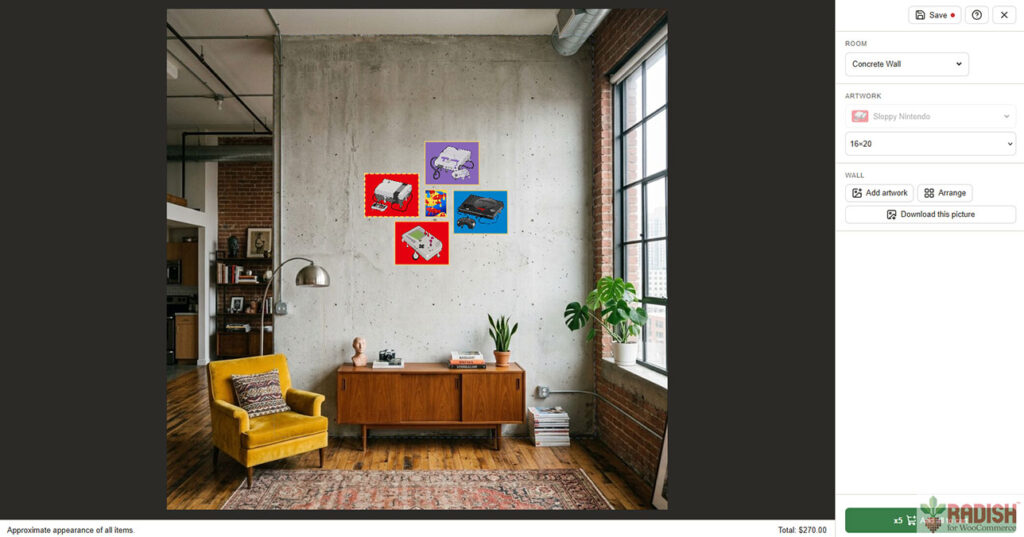
Saved rooms
Someone who measured their wall on Tuesday shouldn’t have to do it again on Saturday. Signed-in customers can save up to six rooms, measured, with the pieces where they hung them. Each one is kept for 90 days after it was last opened.
A link on every product page
The product page is where a shopper is already deciding. Wall Buzz Gold adds a Preview on your wall link to every product with Wall Buzz enabled, and Wall Buzz opens with that piece already hanging when they click it.
Your colors
Wall Buzz has colors of its own that read well on any theme. Wall Buzz Gold’s Colors tab lets you use yours, and checks them for contrast.
What it costs
$79 a year for one site. That’s about $6.60 a month. One extra sale a month more than covers it.
That price includes a year of updates and support. If you don’t renew, Wall Buzz Gold keeps working, and only the updates stop. Renewing is $79 for another year.
There’s no risk to try it. If Wall Buzz Gold isn’t right for your shop, ask within 14 days of buying and you’ll get every cent back. I’m taking all the risk for you!
Free and Gold side by side
| Free | Gold | |
|---|---|---|
| Rooms you set up are offered to every shopper | ✓ | ✓ |
| Work sold in sizes, and originals sold singly | ✓ | ✓ |
| Only your sizes, drawn to scale | ||
| An optional different ratio image for each size | ✓ | ✓ |
| Uses your shop’s chosen unit of measurement automatically | ||
| One piece on the wall, added to the cart | ✓ | ✓ |
| Full screen on computer and phones, like an app | ||
| Shoppers can save a picture of the preview stamped with your website name and URL | ✓ | ✓ |
| Change the wording of the text your shoppers read | ✓ | ✓ |
| Also works with just a keyboard and screen reader | ||
| Translation template provided | ✓ | ✓ |
| A photo of the shopper’s own wall (on mobile, Wall Buzz can prompt for existing photo or take a picture right then) | ✓ | |
| Signed-in customers can save their room configurations | ✓ | |
| Gallery walls of up to 20 prints, bought in one click | ✓ | |
| A preview link on every product page | ✓ | |
| Choose colors to match your theme | ✓ | |
| FREE | $79 a year, per site |
Questions
What does my shop need? WordPress 6.7 or later, WooCommerce 10.0 or later, and PHP 8.2 or later. Work sold in sizes needs to be a variable product, with each size as a variation. Originals and other single pieces are simple products with their size entered on the Wall Buzz tab. You’ll need at least one photo of a room with a clear wall. Shoppers need a browser with WebGL, which almost every current browser has.
Where do shoppers’ photos go? In Free, there aren’t any. Shoppers use the rooms you set up. With Wall Buzz Gold, a shopper’s own photo is read in their browser and isn’t sent to your server. The exception is a saved room: when a signed-in customer saves one, the browser shrinks the photo and strips its camera data, location included, before it uploads. Nothing is uploaded until they save. You can disable this feature altogether.
Will it slow down my product pages? No. Wall Buzz loads its scripts only on its page. With Gold, a product page gets a plain link to it.
Can I change the wording? Yes. Every sentence a shopper reads can be changed in the admin, with no code.
What doesn’t it do? Art hangs flat, with no frame, glass or shadow. Wall Buzz is for checking size and fit. It won’t make styled mockups for your listings.
Can I translate it? Yes. Both plugins come with a translation template.
Is there a user guide? Yes, at paperpixelstudio.com/Wall Buzz /user-guide/. It covers Free and Gold and is updated with every release.
Tonight, someone will look at your work and wonder
Let them see it on a wall instead. Wall Buzz is free, it runs in the shop you already have, and you can set up your first room in under 30 seconds!
get Wall Buzz Gold for $79 a year
P.S. Not sure yet? Open the demo on your phone, pick a piece and switch its size a few times. That’s exactly what your shoppers will see.
